
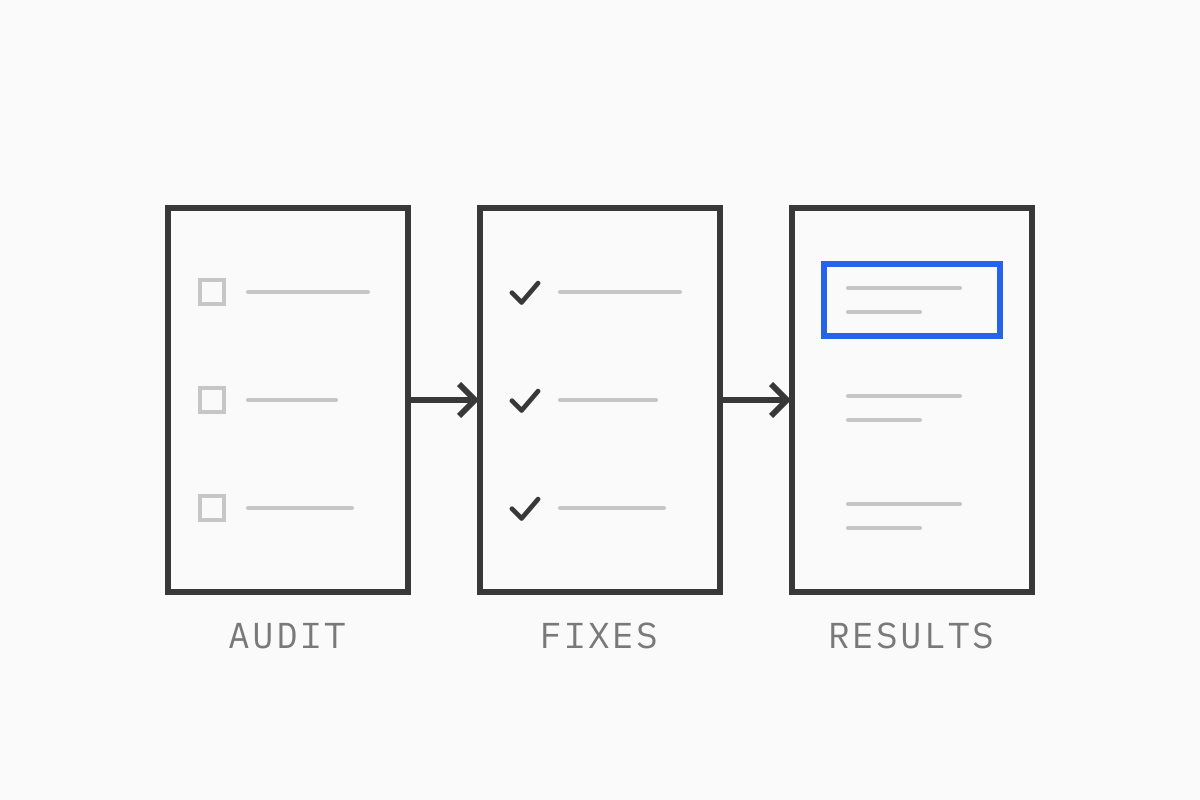
Technical fixes come first, because content and links won’t help pages that can’t be crawled, and they’re the part our developers can verify and fix. The findings then decide the content, the listings and the AI work. This guide walks through how we run an audit, with examples of the problems we see most often on Shopify, headless and custom eCommerce sites.
01Start with who you want to reach
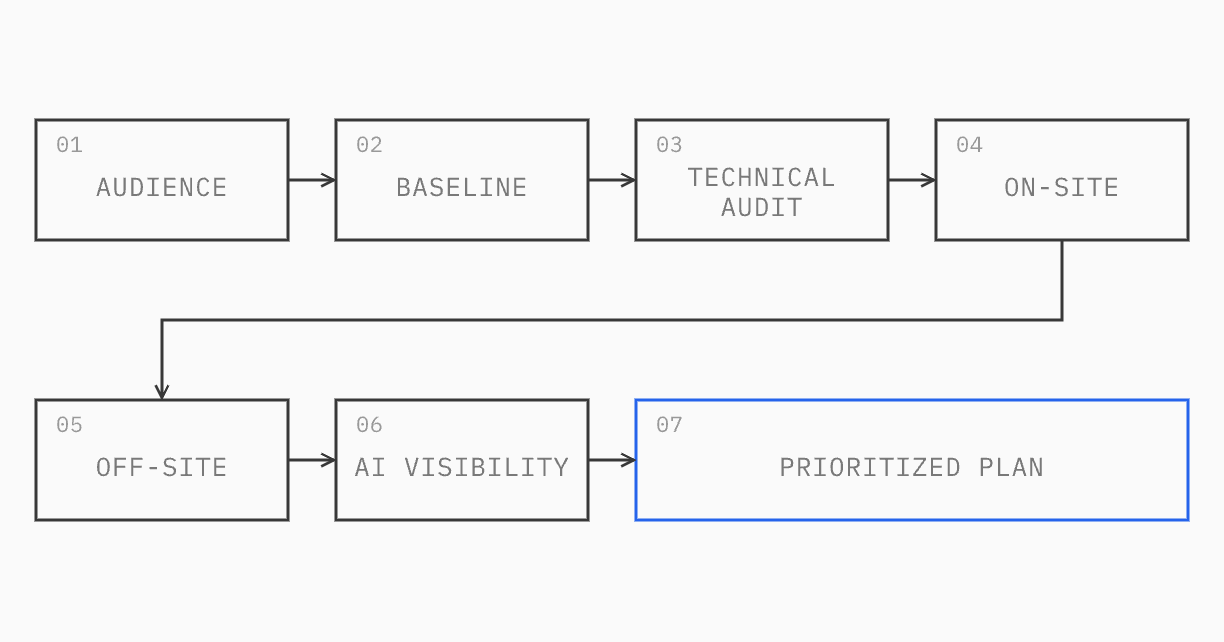
Before we open a crawl report, we write down who the site is for: the types of customer, what each one buys, and how they describe what they need. Every keyword and page decision is checked against that list.
It changes the targets more than you’d expect. A skincare brand might rank for its product names and miss the searches its customers make, such as “moisturizer for sensitive skin” or “routine for oily skin”. An industrial parts distributor might write about “solutions” while its buyers search by part number, size or rating. The audience comes first, and the keyword research follows from it.
We then tag each keyword by intent and score it with one formula: US volume × business value × proof, divided by keyword difficulty plus 10. Business value is how much a sale from that search is worth; proof is whether the site has the products, content or case studies to deserve the ranking. Both start as our estimates and change once the client tells us which product lines matter most. The formula is simple enough to argue about, which is the point: everyone can see why one page comes before another.
One caution on keyword difficulty. It’s useful for comparing terms, but it understates the work for a young or low-authority site. A term marked “easy” can still have a first page full of sites with five times your authority.
02Measure before you change anything
The second step is a baseline report, written before any fix goes live. It records where the site stands today, so every change can be measured against it:
Search performance: non-brand clicks and impressions from Google Search Console, in the markets that matter. We filter out brand searches, because brand traffic hides what SEO is doing.
Rankings: the target keywords and where they rank today.
Technical health: the crawl score and the issues behind it.
Authority: relevant referring domains, not the raw total.
Leads and sales: orders, form submissions and calls from organic search.
AI visibility: how often AI tools cite or mention the site.
Each line becomes a KPI with a definition, a source, a baseline and targets at 3, 6 and 12 months. Visibility and technical targets are firm; revenue and lead targets stay provisional, because they depend on more than search.
Building the baseline is often where the first problems appear. Common ones:
Test traffic in analytics. Staging servers, local development and deploy previews send sessions and form events to the live GA4 property unless they’re filtered by hostname.
Double-counted conversions. A form tracked by both a tag manager trigger and GA4’s automatic form tracking reports every lead twice.
Inflated link counts. Spam domains can add hundreds of referring domains in a few months. Reporting the raw total would show growth that doesn’t exist.
Tool estimates treated as traffic. Third-party traffic estimates are models. Rankings and clicks should come from Search Console.
If the baseline is wrong, every report after it is wrong too, so these get fixed first.
03The technical audit
This is where a developer’s view matters most. A crawler tells you what’s wrong; finding why takes someone who can read the code, the templates and the hosting setup. These are the checks that find the most on eCommerce sites.
Crawling and internal links
A common pattern: Search Console lists a batch of pages as “Discovered, currently not indexed”, with no crawl date. Often they’re product pages that can only be reached through page 6 of a collection, or guides linked from nowhere but the sitemap.
The usual explanation is crawl budget, and it’s usually wrong for a store of a few thousand pages. Search Console’s crawl stats show how many requests Google makes each day. If that’s enough to recrawl the site every few days, Google has the capacity and is choosing not to crawl pages the site treats as unimportant. The internal links report confirms it: navigation pages have dozens of links pointing at them, while the missing pages have none.
The fix is links in context rather than a longer footer: related products, links from buying guides to the products they recommend, breadcrumbs, and collection pages that don’t bury products behind deep pagination.
Duplicate URLs and canonical tags
eCommerce sites create duplicates easily. On Shopify, a product can be reached at its own URL and through every collection it belongs to. Shopify points the canonical tag at the clean URL, but many themes still link to the collection versions, so crawlers spend their time on duplicates. Filters add parameters for color, size and sort order. Tracking parameters, quick-view links and popups can add more.
A typical case: every “Get a quote” button opens a popup through a link with a parameter, such as ?form=quote. A crawler follows each one, so a site of 50 pages shows up as several hundred, and Google indexes some of them instead of the real pages.
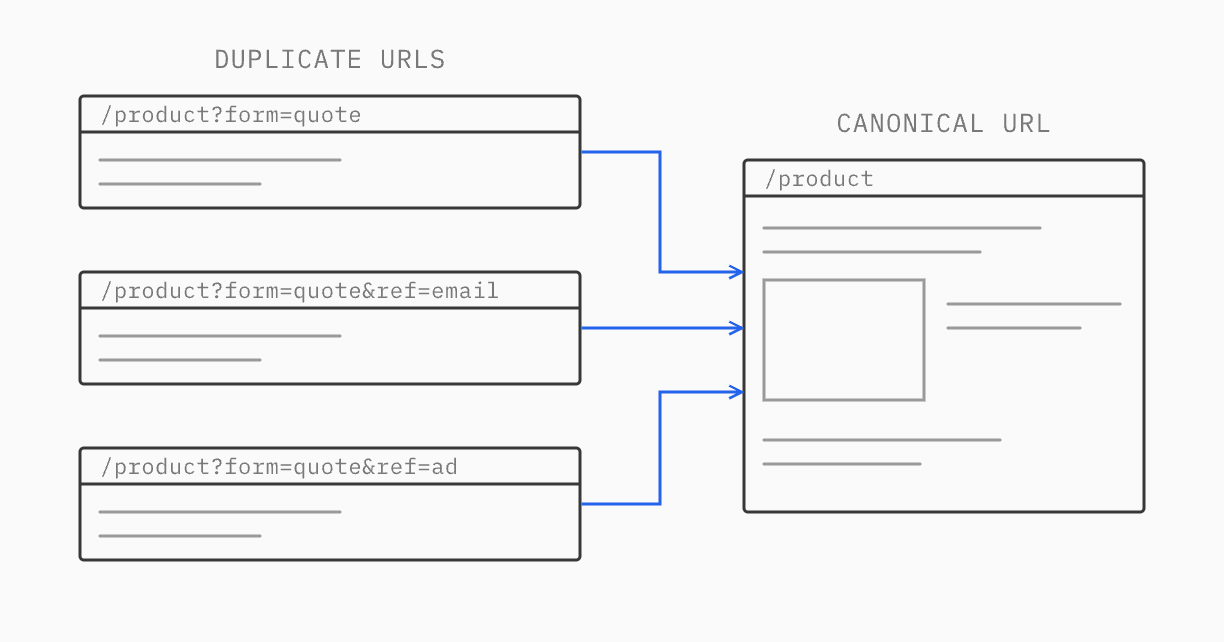
The fix is to make those triggers buttons rather than links, and to give every page a canonical tag pointing to its clean URL. The counterintuitive part: don’t block the parameter in robots.txt. If Google can’t crawl those URLs, it never sees the canonical tag, and the duplicates stay indexed.
Redirects after a migration
Migrations are where rankings are lost, usually through redirects that technically work. The pattern we see most: old category or service pages redirected to the homepage, or to a contact form, because the new site has no equivalent page. The redirect returns a 301, the checker shows green, and the searches that page ranked for have nowhere relevant to land.
The fix is a page or section with the same purpose, and a redirect to it. The same audit usually finds old product URLs with no redirect at all, PDFs that still get impressions but now point somewhere generic, redirect chains left by several earlier migrations, and internal links to old URLs that add an extra hop. Every old URL should reach its final page in one step.
Headless and JavaScript checks
Headless storefronts need checks that most audit tools skip:
Is the content in the HTML? Many AI crawlers don’t run JavaScript. We compare the server HTML with the rendered page: headings, product details and FAQ answers should all be in the HTML.
Do unknown URLs return a real 404? Some frameworks return a 200 status with an error message, which leaves junk pages in the index.
How fast is the first request after a deploy? When a deploy clears the cache, the first crawler requests can hit cold servers and wait several seconds. Requesting every sitemap URL right after each deploy keeps the cache warm.
Are menu links real links? Navigation built with click handlers instead of
<a href>elements can hide whole sections from crawlers.
Speed, measured properly
We test speed in the markets that matter, on mobile, and write down the tool, location and date, because two Lighthouse runs on the same page can differ widely. Lab scores are a starting point for finding problems such as oversized images or layout shift. Real-user data from Chrome is what Google uses, and on a low-traffic site it can take weeks to appear. Our website performance guide covers the measurement side in detail.
04From technical findings to on-site changes
Once the site can be crawled properly, metadata and content are where the strategy shows. We keep every page’s target keyword, title tag, meta description and H1 in one table, with formulas that check lengths: titles up to 60 characters, meta descriptions between 120 and 155. After changes go live, we check the live pages against the table rather than trusting the CMS.
The on-site problems we find most often:
Template fallbacks. Press releases, filtered pages or archive pages that all use the homepage title and description, because their template has no fields of its own.
Descriptions that contradict the page. A meta description that quotes an old price, an old size range or a specification the product page no longer matches.
Claims that can’t be sourced. “#1” or “best-selling” in titles, with nothing on the page to back them up.
Pages competing with each other. The homepage ranking for a category term instead of the category page.
Details locked in PDFs. Specifications or size guides in PDF downloads instead of HTML, so the product page Google ranks doesn’t carry them.
Content decisions come from the same data. A product line that lost its page in a redesign comes back as a section on an existing page if that’s enough to answer the search, and as a new page only if it needs one. Thin pages with no search demand and no internal links get merged or redirected.
05Off-site: directories and partnerships
Links still matter, and for most eCommerce businesses the best ones are already within reach:
Brands and manufacturers you stock or work with, many of which have stockist pages or dealer locators.
Suppliers and technology partners, through partner directories and case studies.
Industry associations you already belong to.
Directories and marketplaces your buyers use, from business listings to review platforms.
We check what’s already there before adding anything: lost links, outdated listings, and profiles with the wrong name or address. We skip paid placements that exist only to sell links.
The technical side applies here too. Each listing should carry the same facts as the site: the same business name, address, product range and description. When those agree, both search engines and AI tools can match the listings to the business.
06AI visibility
AI answers are now part of search, and the audit covers them like any other channel:
Access: robots.txt allows the AI search crawlers, and nothing in the hosting firewall blocks them.
Readable facts: each priority page opens with two or three factual sentences, because in our checks, AI answers quote short, clear statements and skip marketing introductions. Organization structured data tells AI tools who the business is, what it sells and where it ships.
Measurement: a monthly check of the same buyer questions in ChatGPT, Perplexity and Google’s AI Mode, logged out and from the target market, plus AI citations in a tool such as Ahrefs and AI referral traffic in GA4.
The first check is usually the most useful. Ask an AI tool for the best brands or suppliers in your category, and look at where the answer comes from. It’s often a handful of directories, partner listings and “best of” articles. That tells you where to be listed. In our checks, AI citations also tend to follow Google rankings, so AI work sits inside the SEO plan rather than running as a separate project.
07How we prioritize and report
The audit ends as a checklist and a plan. Each check has a result (pass, fail, warning or to verify), the pages affected, the fix and a priority. Technical fixes come first, then the pages closest to revenue, then the rest.
Every decision goes in a log with the evidence behind it. When a decision changes, it’s marked as corrected rather than deleted, so anyone can see why the plan looks the way it does. After changes go live, we check daily for two weeks, weekly for two months, and then monthly against the baseline. Conversion work follows the same rules: our CRO audit guide covers how we find what to fix, and our A/B testing guide how we measure it.
08Requesting an audit
Our developers have 15 years in eCommerce, and we audit the sites we’d be fixing: Shopify, headless and custom builds. If you want to know what’s holding your site back in search and AI answers, and what to do first, request an audit.
09FAQ
What does an eCommerce SEO audit include?
A technical review (crawling, indexing, redirects, canonical tags, rendering, speed and structured data), a baseline of search performance and sales, keyword research tied to your audience, a review of metadata and content, off-site listings and links, and AI visibility. It ends with a prioritized plan.
How is a technical SEO audit different from a full SEO audit?
A technical audit checks whether search engines and AI tools can find, read and index your pages. A full audit uses those findings to decide which searches to target, what to change on each page, where to get listed and how to measure progress.
How do you optimize an eCommerce site for AI search?
Make sure AI crawlers can access the site and read the content without JavaScript, open key pages with short factual statements, add Organization structured data, keep the same facts on every directory listing, and track AI mentions and referrals each month.