
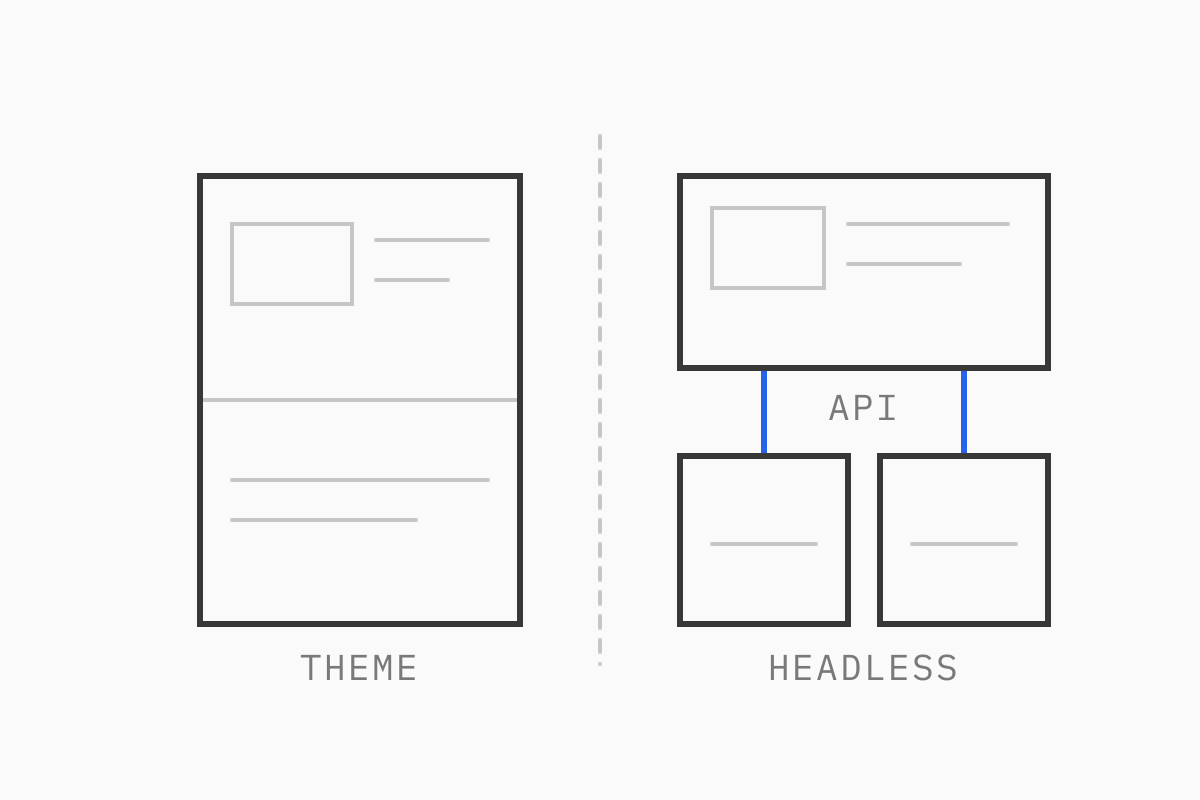
A theme costs less to maintain, works with the whole app ecosystem and lets your marketing team edit pages without a developer. This guide compares the two on cost, apps, SEO, speed and team impact, so you can tell which side of that line your store sits on.
Our developers have 15 years in eCommerce, and we’ve been a Shopify Select Partner since 2019. We’ve built both.
01What headless Shopify means
A Shopify theme is the storefront Shopify hosts for you. It’s written in Liquid, Shopify’s templating language, and it renders your products, collections and pages on Shopify’s servers.
Headless Shopify splits that in two. Shopify still runs the catalog, inventory, orders, customers and checkout. The storefront becomes a separate application, usually built in React, that reads from Shopify through the Storefront API and from a CMS such as Contentful for editorial content. You host that application yourself, or on Shopify’s own hosting if you build with Hydrogen.
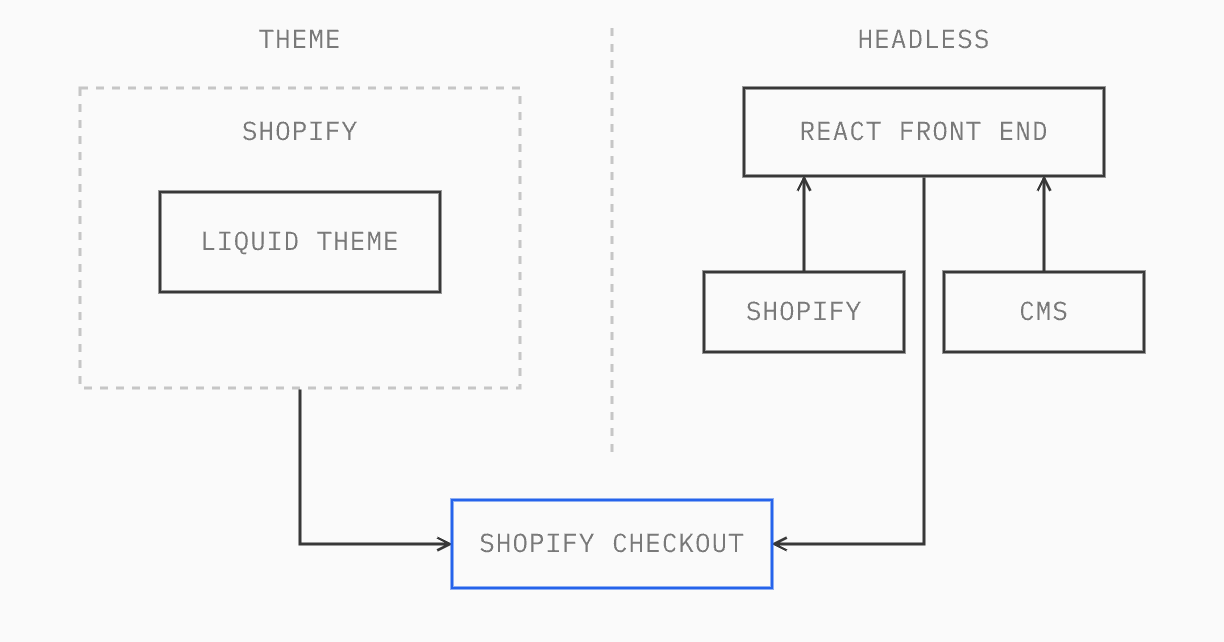
So “headless” only changes the front end. Your team still runs the business in the Shopify admin.
02What a Shopify theme can do today
Several of the gaps that used to push brands to headless have closed.
Sections everywhere. Online Store 2.0 themes use JSON templates, so marketers can add, remove and reorder sections on any page type in the theme editor. Each template can hold up to 25 sections, each with up to 50 blocks.
Theme app extensions. Apps add their features as app blocks the merchant places in the theme editor, rather than by injecting code into theme files.
Structured content. Metafields and metaobjects let you model custom content (ingredient lists, designer profiles, lookbooks) and render it in the theme. That covers a lot of what used to push brands toward a separate CMS.
Several markets from one theme. Shopify Markets gives each market its own currency, language and URL subfolder, and the theme outputs hreflang tags for them.
Version control. Shopify’s GitHub integration syncs a theme with a branch in both directions, so code changes go through pull requests and theme editor changes are committed back to the repository.
A theme still has limits. Liquid renders on Shopify’s servers with the data Shopify exposes, the page structure follows Shopify’s templates, and anything highly interactive ends up as JavaScript layered on top. But the line has moved, and a lot of stores that would have gone headless in 2020 don’t need to now.
03Checkout stays on Shopify either way
A headless storefront doesn’t get its own checkout. When a shopper on a headless site clicks “Checkout”, the cart’s checkout URL sends them to Shopify’s hosted checkout, the same one a theme uses.
That means checkout customization works the same in both cases. Checkout Extensibility (checkout UI extensions, Shopify Functions and web pixels) is how you add fields, upsells, delivery rules or custom discounts. Extensions on the information, shipping and payment steps need Shopify Plus, whichever front end you choose. If your reason for going headless is “we want a custom checkout”, headless won’t give you that.
04How the two compare
Apps
On a theme, most apps install in minutes and appear as app blocks. On a headless build, apps that only work in the back end (subscriptions billing, ERP sync, fulfillment, email) carry on working, because they talk to Shopify, not to the storefront. Apps that render something on the page (reviews widgets, loyalty panels, upsell popups, many personalization tools) usually don’t drop in. You need the app’s API and a developer to build the front-end piece, or a headless-ready alternative.
Before choosing headless, list every app that touches the storefront and check whether it offers an API or SDK. That list often decides the question on its own.
The marketing team’s day-to-day
The theme editor is a real advantage. Marketers can build a landing page from existing sections, preview it and publish it the same afternoon. On a headless build, the equivalent comes from your CMS: Contentful gives editors structured content types, scheduled publishing and previews, but someone has to design those content models and build the matching components first. Done well, editors get more control than the theme editor gives them. Done badly, every new page type is a development ticket. There’s more on that in our guide to what Contentful does for content teams.
SEO control
Both approaches can rank well. A theme gives you sensible defaults out of the box: canonical tags, sitemaps, hreflang for Markets, and an editable robots.txt through a robots.txt.liquid template. What you can’t change is Shopify’s URL structure (/products/, /collections/, /pages/).
Headless gives you full control of URLs, rendering and markup, which helps when your content architecture doesn’t fit Shopify’s patterns. It also means your developers own every SEO detail: server-side rendering, meta tags, structured data, sitemaps, redirects. Hydrogen ships helpers and default sitemap and robots routes; a custom Next.js build needs these written. A headless site that renders content only in the browser, or that loses redirects at launch, can lose rankings that a theme would have kept.
Speed
Themes are less of a performance handicap than they were. A lean theme with few apps can score well on Core Web Vitals, and a heavy theme loaded with app scripts will be slow whatever you do to the Liquid.
Headless gives developers more control over what loads and when, with server-side rendering, caching at the edge and code splitting per route. That control only pays off if the team uses it: a React storefront that ships a large JavaScript bundle can be slower than the theme it replaced. Measure before and after, using field data rather than a single Lighthouse run. Our eCommerce site speed guide explains how we do that.
Team and maintenance cost
This is where the two differ most. Building a headless storefront takes broadly the same effort as building a customized theme of similar scope. Running it costs more.
On a theme, Shopify maintains the storefront platform, and most changes are Liquid edits or theme editor work. A headless storefront is a software application your team owns. Shopify releases a new API version every quarter and supports each one for at least 12 months, so the Storefront API calls in your code need upgrading on a regular cycle, and the framework and its dependencies move too. Some of those upgrades mean rework, not just a version bump. Changes a marketer or an app would handle on a theme need a developer. And the team needs React developers who understand both the Storefront API and your CMS, not only Shopify developers who know Liquid.
Changing agencies is possible with both. On headless, it depends on the code being documented and built on a mainstream framework.
05When headless makes sense
In our experience, four situations justify the extra cost.
Complex content structures. Editorial content, lookbooks, guides and product storytelling that need to be modeled, reused and scheduled across many pages. On a headless build, a CMS such as Contentful can model that content once and reuse it on every page that needs it.
Several markets on one codebase. Kimai, a fine jewelry brand, runs four international sites (US, UK, Europe and a French translation) on headless Shopify Plus with Contentful. The first reason for headless, back in 2019, was the experience itself. Kimai was a new brand selling fine jewelry online, so the site and the branding had to build the trust a new name doesn’t have yet, and it wanted a storefront that stood apart from other jewelry sites. The same codebase has since grown to serve every market. You can read more in the Kimai case study.
A front end a theme can’t deliver. Published By, an Austrian bag and accessories brand, wanted a custom 3D bag animation as the centerpiece of the store, optimized to render fast on mobile. They wanted the whole site built around it, with a distinctive user experience and no limits set by a theme’s structure. We built it as a headless Shopify storefront with a React front end.
A front end shared across channels. When the same components power a website, an app and in-store screens, headless avoids building them twice.
Compare that with CAST, a San Francisco jewelry brand on Shopify Plus. Their needs (custom navigation, filters by style, stone, material and size, detailed product pages and a gift-with-purchase feature their team configures in the theme editor) all fit inside a customized theme. Headless would have added cost without adding anything they needed.
We have this conversation often. A French luxury brand and a design-led fashion brand both asked us about headless. In each case we explained how a headless build would work for them, and then recommended staying on a theme, because what they wanted was achievable in a theme and the higher maintenance cost of headless wasn’t justified.
06Hydrogen vs Next.js
If you go headless on Shopify, the first technical choice is the framework.
Hydrogen is Shopify’s own framework for headless storefronts. Current versions are built on React Router, with components and utilities pre-wired to Shopify’s APIs (cart, customer accounts, analytics, SEO helpers). It deploys to Oxygen, Shopify’s hosting, which at the time of writing comes at no extra charge on paid Shopify plans from Starter up to Plus. It can also pull content from a CMS such as Contentful.
Next.js is a general-purpose React framework, hosted on Vercel or your own infrastructure. It knows nothing about Shopify out of the box, so you build the Storefront API layer yourself or use a starter. In exchange you get a larger ecosystem and more hosting options, which helps when Shopify is one source among several.
Hydrogen is now our default for headless Shopify. We run it in production, and we’ve moved most of the headless Shopify stores we work on to Hydrogen: staying close to Shopify’s own tooling makes API upgrades and new Shopify features easier to absorb, which matters given where the maintenance cost sits. We’d choose Next.js when the front end serves more than Shopify, for example a site where heavy CMS content is the main event, or one that combines several data sources and shares components with other channels.
07Cost and timeline
The bigger cost difference comes after launch.
Customized Shopify theme | Headless Shopify | |
|---|---|---|
Build effort | Similar for the same scope | Similar for the same scope |
Hosting | Included in your Shopify plan | Free on Oxygen with Hydrogen; Vercel or your own hosting for Next.js |
Storefront apps | Install as app blocks | Often need custom front-end work |
Platform upgrades | Handled by Shopify | Regular Storefront API and framework upgrades, some needing rework |
Day-to-day changes | Many done by your team in the theme editor | More of them need a developer |
Who can maintain it | Most Shopify developers | React developers who know the Storefront API and your CMS |
Your Shopify plan costs the same either way, and so does checkout. The difference is the CMS license if you add one and, above all, the cost of keeping a separate application up to date.
08How we’d decide
Start with a Shopify theme unless you can name the thing a theme can’t do. If the answer is a content model that outgrows metaobjects, several markets that need one shared codebase, or a front end you’ll reuse across channels, headless is worth the higher running cost. If the answer is “speed” or “a better checkout”, fix the theme first: checkout is Shopify’s either way, and most slow themes are slow because of apps and scripts, not Liquid.
If you’re also weighing Shopify against other platforms, our guide on how to choose an eCommerce platform covers that step. For the build itself, see our Shopify development and headless commerce services.
Not sure which side of the line your store is on? Book a call with a technical lead and we’ll look at your stack, your apps and your roadmap.
09FAQ
What is headless Shopify?
Headless Shopify means Shopify runs the back end (products, inventory, orders, checkout) while the storefront is a separate application, usually built in React with Hydrogen or Next.js, that reads data through Shopify’s Storefront API. Checkout still happens on Shopify.
How much does headless Shopify cost compared with a theme?
Building one costs about the same as a customized theme of similar scope. The difference is maintenance: a headless storefront needs regular API and framework upgrades, more changes go through developers, and you may pay for hosting (unless you use Oxygen) and a CMS. Your Shopify plan and checkout cost the same either way.
Is Shopify Hydrogen better than Next.js for headless Shopify?
For a headless Shopify store, Hydrogen is our default: it’s built for Shopify, with Shopify-specific components and free hosting on Oxygen, and we’ve moved most of the headless Shopify stores we work on to it. Next.js makes more sense when the front end serves more than Shopify, such as heavy CMS content or several data sources.
Is a progressive web app (PWA) the same as headless?
No. A PWA is a set of browser features (installability, offline caching, push notifications) that can be added to many kinds of website, headless or not. The speed often credited to PWAs usually comes from good caching and lean JavaScript, which a Shopify theme can deliver too.